Avid has three powerful new features designed to help you move faster, act smarter, and invest with confidence:
- AI-Assisted Audience Creator
- Smart Plays in Playbooks
- ROI Reporting in Key Campaign Reports
Each one removes friction from your workflow. Together, they turn insight into action, instantly.
Watch the video below for an overview of each feature, or keep reading to discover what each feature can do to help make your team more efficient and drive better results.
1. Build Advanced Audiences with a Simple Prompt
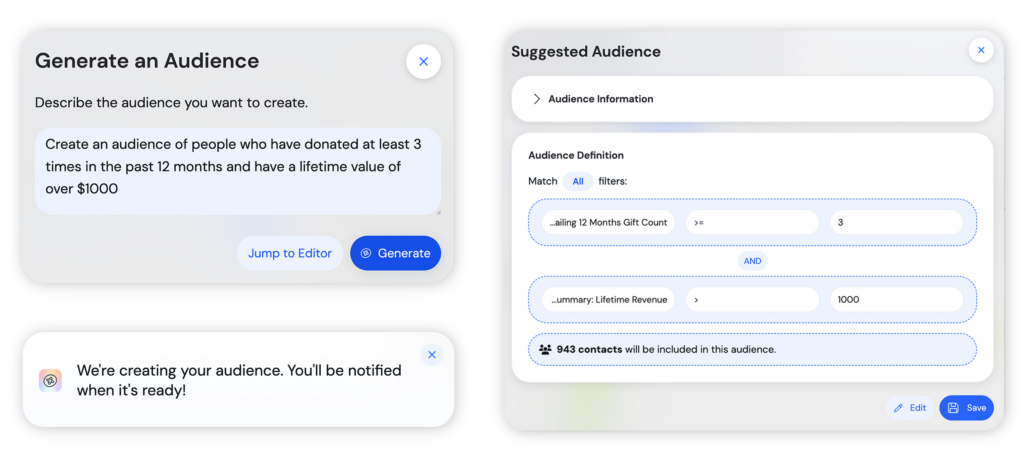
You already have access to all your donor data inside Avid. But sometimes building the right segment can feel complex with so many fields, and so many filters.
But now you can just describe what you want.
With the AI-Assisted Audience Creator, you can type a simple prompt like:
“Create an audience who has given at least three times in the past year and has a lifetime value over $1,000.”
Edna does the rest.
Behind the scenes, Edna:
- Identifies the right data sources
- Applies the correct logic
- Builds the segment instantly
- Even drafts a summary of who this audience is and how to speak to them
You can refine it. Or save and launch.
No more digging through filters or second-guessing your logic. Just faster segmentation and more sophisticated targeting in seconds.
2. Launch Fully Customized Campaigns with Smart Plays
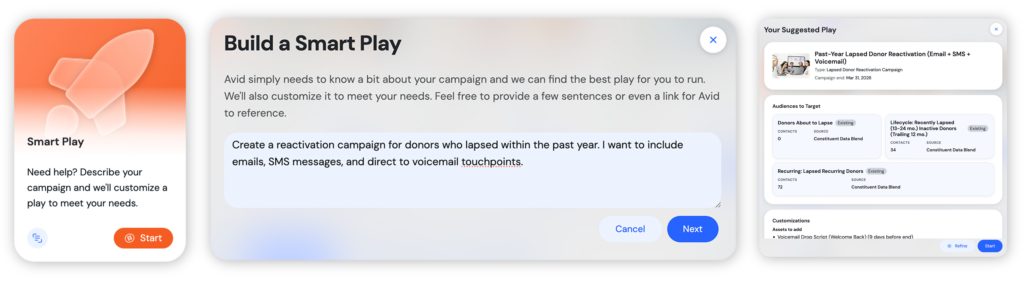
Inside Playbooks, you’ve always had access to proven campaign frameworks.
But now, you can create one built just for you.
With Smart Plays, simply describe your goal:
“Create a campaign to reactivate donors who lapsed in the past 12 months using email, SMS, and voicemail.”
Edna searches across the entire Playbook catalog, combines best-performing strategies, builds the audiences, customizes the channels, and generates a fully tailored campaign.
You get:
- A named, structured campaign
- AI-generated target audiences
- Channel-specific touchpoints
- A clear strategic rationale
You can refine it, or hit start.
Instead of choosing from static templates, you get a dynamic, AI-built strategy aligned to your goals.
3. See True ROI, Not Just Revenue
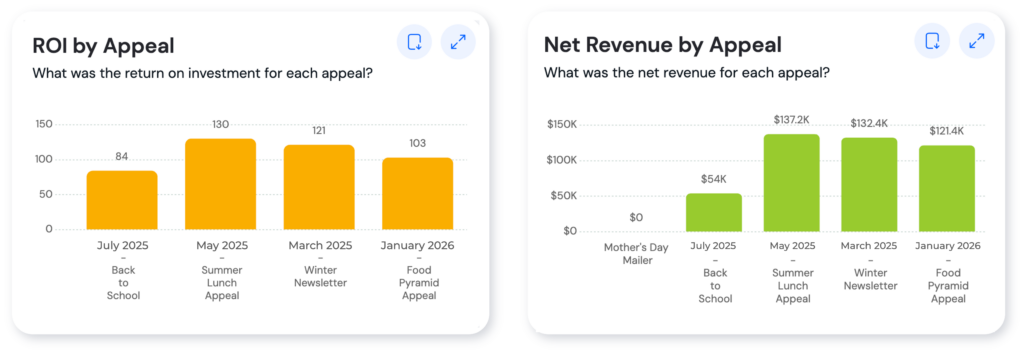
Revenue tells part of the story. ROI tells you where to invest next.
With new ROI Reporting embedded directly into key reports like Matchback and Appeal Analysis, you can now:
- Upload cost data
- Track spend by appeal, campaign, or package
- View net revenue and ROI alongside performance metrics
- Identify top-performing investments, not just top-line revenue
Now you can answer the questions that actually drive growth:
- Which campaigns truly paid off?
- Where should we double down?
- Which channels are delivering transformational returns?
No spreadsheets. No guesswork. Just full financial visibility inside Avid.
From Data to Action, Instantly
These features work together to change how you plan, launch, and scale fundraising altogether.
They connect your data so you can:
- Build the right audience in seconds
- Launch a customized, multi-channel strategy
- Measure true ROI and reinvest intelligently
Not using Avid yet? Schedule a demo to see these new features at work for your organization »