Year-end fundraising season is the biggest giving season of the year. But it’s becoming increasingly difficult to activate and reactivate donors.
Why is it getting so difficult?
Our donors’ expectations have changed. Donor communication needs to be personalized. Segmented. Cross-channel.
During a given campaign, a donor might interact with 5, 6, or 7 different touch points before choosing to give.
For instance, they might:
- See a social post from you on Facebook, Instagram, TikTok, or LinkedIn.
- Read a cultivation email from your in their inbox later.
- Find a direct mail piece from you in their mailbox.
- See a few display ads about your campaign while they’re reading a news article.
- Get a voicemail from you letting them know about the campaign.
- Ultimately donate from an email appeal.
Every touchpoint matters—even if it didn’t directly lead to the donation.
But our budgets, teams, and resources haven’t kept up.
The scale needed to achieve fundraising growth today is more than any fundraiser or team can keep up with on their own.
The only way to meet donor expectations this year-end season is with an AI-driven playbook.
Looking for help with Giving Tuesday? Check out the AI-driven Giving Tuesday playbook here.
Year-End Fundraising Trends at a Glance
There are a million and one metrics you could analyze to try and understand what’s happening in year-end fundraising.
But there are a few critical metrics worth focusing on to shape our year-end fundraising playbook.
1. Year-End Giving is on the Decline
Looking at year-end giving from year to year can paint an unrealistic picture of results.
There are many factors that can influence year-end giving.
Major economic shifts.
Election cycles.
Natural disasters.
All these major events can cause significant ripple effects in year-end giving.
But even seemingly small things can impact results. In fact, the day of the week that December 31st falls on plays a big part in when results come in.
If it’s a weekday, you’ll see better results. If it’s a weekend, giving is usually a bit lower.
Looking at the 5-Year Trend
When trying to understand the true trajectory of year-end giving, it’s best to look at a longer trend.
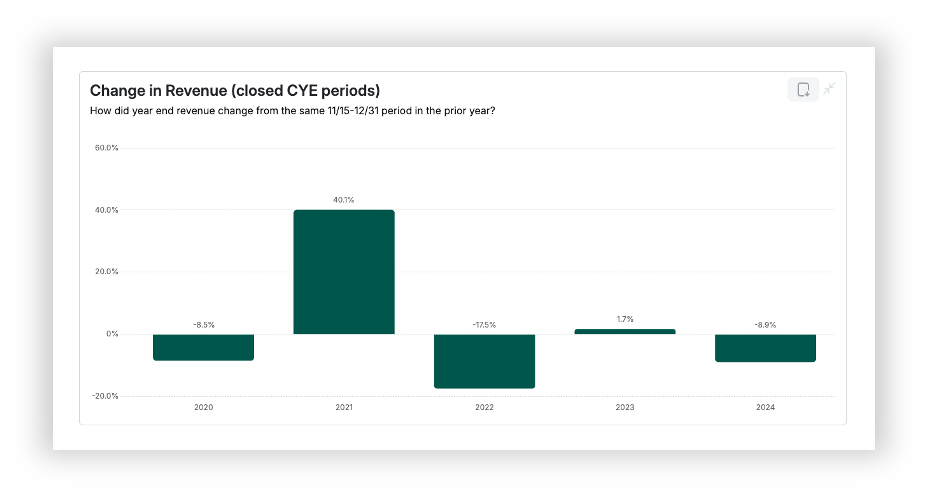
Using Avid Benchmarks, we’ve looked at the past 5 years of year-end giving. And the result is a bit bleak.
There are up years.
There are flat years.
But the 5-year trend is that year-end giving is on the decline.
2. Year-End Donor Acquisition is Down
When you look at year-end fundraising trends as a whole, donor acquisition is falling off.
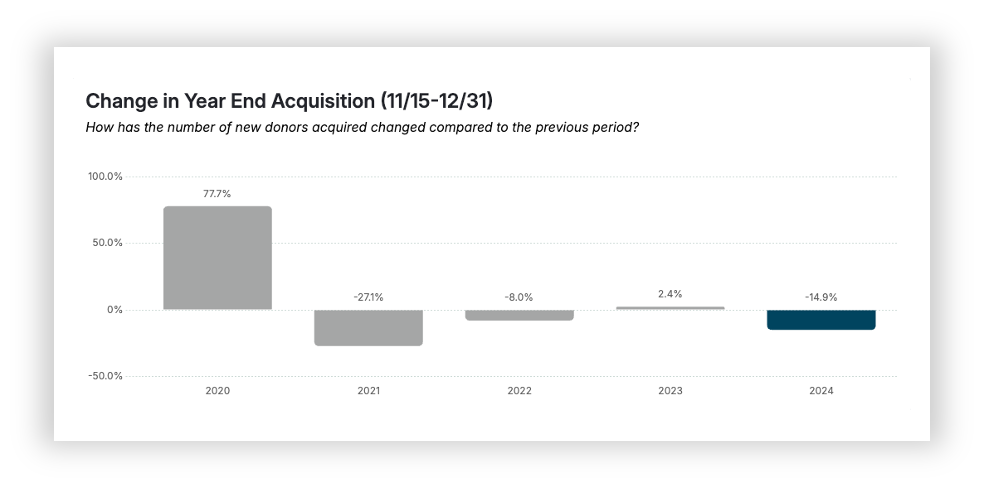
Year-end donor acquisition has decreased year-over-year for the past 4 years.
There used to be a time where an event like year-end was heralded as a significant time for new donor acquisition.
By and large, there is still a lot of new donor acquisition that happens during year-end. But the trend is that year-end acquisition is on the decline.
Are we getting worse at acquiring donors in December? Are fewer new people giving in general?
The way we see it, donor behavior is shifting.
There is a lot more acquisition activity that happens throughout the year—especially with such a big push towards recurring donations.
We can’t rely on new donors to be the only method to grow our year-end results.
3. Omni-Channel Strategies are Driving Up Fundraising Revenue
If we zoom out to look at trends beyond just year-end, there is another opportunity.
The more contactable a donor is, the more likely they are to upgrade and have a higher annual value.
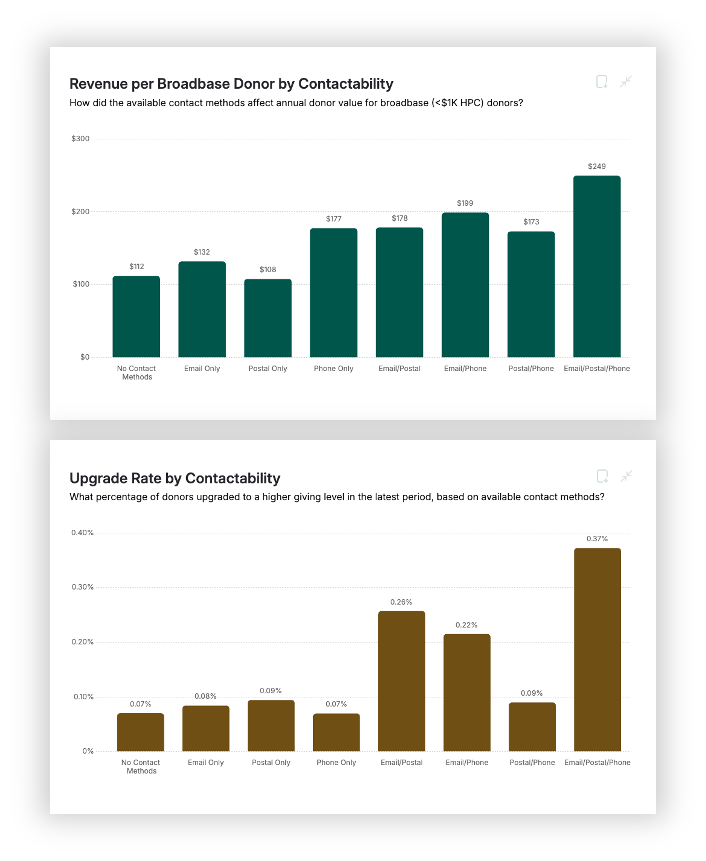
But this isn’t purely about having more of their contact info.
It’s about donor behavior.
Even if donors only ever give in a specific channel, they’re interacting across channels all the time.
Direct-mail-only donors are still online.
They interact on social media channels.
Many of them read their email religiously.
They watch TV like anyone else, and can be influenced by media channels like CTV, Youtube ads, and more.
During the most chaotic and noisy season of the year, we have to be present in as many channels as possible to have a chance at getting their attention.
The AI-Driven Year-End Fundraising Playbook
What does an AI-driven year-end campaign actually look like?
It incorporates an omni-channel approach.
It has touch points that both cultivate and activate.
Each touch point has robust segmentation.
An AI-driven playbook is not designed to be simple. It’s designed to keep up with increasing donor expectations.
To pull this off during a season as busy as year-end, you’ll need an AI-powered fundraising operating system like Avid.
Keep reading below to take a closer look at all the channels, touch points, and audience that go into creating an effective year-end campaign.
You can also download the free AI-powered year-end playbook here »
Let’s take a closer look at the Channels, Touch points, and Audiences.
Early to Mid-December Touchpoints

Donation Pages & Landing Pages
Year-End Donation Page
Your year-end donation page is the cornerstone of your campaign. Even your direct mail outreach can lead to people finding your year-end donation page from printed URLs or from a quick search.
This page should make it clear that it’s about year-end giving. It should unpack your full value proposition for the campaign, focusing on the impact of giving—not just the tax deduction.
At the same time, it should clearly highlight the urgency of the year-end deadline as well as any other donation incentives you may have.
Free Content Offer Funnel
Landing Page | Free Content Offer
As with the Giving Tuesday campaign, you’ll want to have a free content offer at the ready throughout the year-end season. Consider offering an eBook, video series, or other unique content that helps potential donors connect deeper to the cause and the impact of your organization.
You’ll leverage this both for new donor acquisition as well existing donor activation.
Automated Email | Free Content Offer Delivery
A small, but critical touch point. Make sure to create an automated email that sends instructions on how to access the free offer. This should be sent as soon as someone fills out the “Free Content Offer” landing page form.
Instant Donation Page | An Opportunity to Give Right Away
This is a modified version of a confirmation page for the free offer. Like a normal confirmation page, it should thank the user and confirm that the offer is on its way to their inbox.
Then, it should immediately pivot towards a donation ask tied to your year-end campaign. Give a strong appeal on the page, making connections between the value of the offer and the impact of a donation. Include a donation form on the page to give right away.

Advertising
Pop-Ups & Web Banners
You may use a variety of different types of pop-ups and website banner placements throughout December. Here are some options to consider:
Homepage Banner
Your homepage is a primary place to include a direct donation ask in a web banner.
Don’t shy away from copy here. Consider a Wikipedia-style donation ask with significant copy communicating why someone should give. And include a gift array right on the banner.
In-line Article Ads
Add year-end giving calls-to-action and ad placements within articles and blog pages on your website. Donation conversion rates are high during the month of December, and these ads are a great way to draw attention to giving opportunities from your motivated organic traffic.
Abandon Donation Pop-Ups
When someone visits the donation page but doesn’t complete their gift, use pop-up or slide-in banners to remind them to finish donating.
Just because they didn’t finish donating doesn’t mean they didn’t want to. They may have been pulled away or distracted from giving for many different reasons. This type of ad placement can draw them back in and boost your year-end donations.
Paid Social Advertising
Acquisition Advertising
Advertise your free content offer to known email subscribers and web traffic who are not yet donors. Consider targeting a “lookalike” audience of Meta users who have similar behaviors as your most valuable donors.
Direct-to-Donation Advertising
Use direct-to-donation ads to remind existing donors of the opportunity to participate in year-end giving. Consider focusing these ads on re-targeting donation page traffic through the month of December.
You might also ratchet up the budget of these ads the closer you get to the last week of the year when urgency is higher.
Google Performance Max Ads
A Google Performance Max campaign should be focused on reminding donors, followers, and website traffic of the opportunity to participate in year-end giving. These ads are best focused on a direct donation call-to-action for likely donors.
You may also consider using strong video creative for Youtube and CTV ads that showcases the impact donors can make with their gift as a primer for appeals coming later in the season.

Emails and Other Timely Outreach
Email 1 | Main Year-End Overview
The first year-end fundraising appeal. It is typically reflective, highlights the impact of giving, and introduces a direct ask.
Use this email to set the stage for your whole campaign—including things you’ve accomplished this year, goals for the year ahead, and any special incentives to give before the end of the year.
Send Date: End of 1st Week, After Giving Tuesday
Email 2 | Testimonial
This email shares a testimonial from someone impacted by your organization. It’s designed to reinforce the impact of a gift, build credibility, and cultivate the potential donor.
You may include a soft donation ask in a P.S. But the main focus of this email should be to prepare the reader for future appeals.
Send Date: End of 1st Week, Start of 2nd Week
Email 3 | Free Content Offer
This email should promote your free content offer. Include your email subscribers who have never given in this email. You can even use it to help activate existing donors who have yet to give to your year-end campaign.
Don’t ask for a donation within this email. Instead, focus it entirely on the free offer—letting the Instant Donation Page help lead to donation conversions.
Send Date: Middle of 2nd Week
SMS | Free Offer Reminder
Use an SMS message to promote your free offer as well. The high open rates of your SMS guarantee visibility of your offer. Give a clear call to action to get access to the free offer.
Send Date: Middle of 2nd Week, Same Day as Your Free Offer Email
Email 4 | Accomplishments
This email is focused on helping the potential year-end donor understand how the organization has made strides and impact this year. It helps boost confidence in future giving and builds trust with the donor.
Be sure to give some ideas of future goals and the need for year-end donations to continue the impact. Close with a clear call to action to give.
Send Date: End of 2nd Week
Email 5 | Executive / Board Member
This email should be sent from an executive leader at your organization or even a board member. The purpose is for donors to hear from a key leader of the organization to establish greater trust and show the investment in future impact from every level of the organization.
Send from your CEO, Executive Director, or Board Chair. Make it personal and give their own unique perspective on the year ahead. Make a clear donation ask.
Send Date: Beginning of 3rd Week
Email 6 | Mid-December Reminder
The Mid-December Reminder email is a chance to recall the primary reasons for the year-end campaign. Reiterate the core value proposition, additional incentives to give, and the goals for the year ahead.
Remember, the average email is only opened by 20% of your subscribers. So it’s likely that many missed your original year-end overview email.
Send Date: End of 3rd Week
Slybroadcast | Cultivation Voicemail
A Slybroadcast sends a voice message directly to your recipient’s voicemail. Use this as a chance to share a story or testimonial with the potential year-end donor.
Don’t make a heavy-handed donation ask. Instead, create an inviting cultivation message that increases their confidence in the impact they can make when asked to give later on.
Consider adding a holiday greeting if relevant to your audience.
Send Date: End of 3rd Week
Last Week of December Touchpoints
Donation Pages & Landing Pages
Year-End Donation Page
Keep the same year-end donation page as you had in early December, but with a few modifications.
Consider adding a countdown clock that ticks down to the end of the day on December 31st. If you have any unique incentives for the last week of the year, call those out in a high-contrast design to ensure donors see them.
Advertising
Pop-Ups & Web Banners
Banner Updates
Update your existing banners and ads to include a countdown clock now that the deadline is within sight. Tweak your copy to focus specifically on urgency, driving traffic directly to your donation page.
Homepage Takeover
During the last 24-48 hours, consider replacing your homepage with a dedicated year-end giving page. Use conversational language, a countdown clock to show the urgency, and include a donation form right on the page.
Don’t forget to include a link for visitors to bypass the page if they are on the website for some other reason.
Paid Social | Direct-to-Donation Ads
In the final stage of your campaign, consider shifting all of your advertising to direct-to-donation ads. You can update your ad creative to have higher urgency and mention the coming year-end deadline.
Google Performance Max Ads | Direct-to-Donation Ads
Make similar updates to your Google ads as well. Focus your creative around the urgency to give before the year-end deadline.
Emails and Other Timely Outreach
Email 7 | Holiday Greeting
This email is purely cultivation and relationship building. It should not ask for a donation.
If your donors are likely to celebrate a particular December holiday, you can lean into a tailored holiday greeting that aligns with their celebration and shared values.
Make this a warm, personal note. You can even link to a personal video celebrating the season, the accomplishments of the year, and what’s ahead in the new year.
Send Date: December 23-24
Email 8 | Just a Few Days Left
This email should begin to ratchet up the urgency. Use this email as your last primary touchpoint to share the value proposition for your year-end campaign.
Focus on the impact a gift will make in the new year, but don’t dive into too many details. Highlight the deadline to give that’s coming soon. Remind recipients of any incentives to give—and introduce any additional incentives you have for the last week.
End with a clear donation call to action.
Send Date: December 26
SMS | Last Week to Give
Support your “Just a Few Days Left” email with a corresponding SMS message. Provide clear reasons why a gift is impactful, remind of any incentives, highlight the upcoming deadline, and give a clear donation call to action.
Send Date: December 27
Email 9 | December 30th Reminder
The day before the deadline, send a kind and personalized reminder to give. Keep it relatively short—2 to 3 quick paragraphs—and focus the reader’s attention on the deadline to give. Consider including a countdown clock graphic to further increase urgency.
Send Date: December 30
Slybroadcast | Deadline Reminder
Support your last few emails with another Slybroadcast message sent directly to your potential donor’s voicemail. This time, focus on the impending giving deadline, and give a clear way for the recipient to respond with a donation.
Send Date: December 30
Email 10 | December 31st AM, Reminder
On the morning of December 31st, send a short and personal note to remind recipients that today is the final day to give. Remind them of any incentives to give.
Don’t go into great detail about the campaign and impact of giving. This email is designed to be short, to the point, and capitalize on the good will you’ve built up with prior cultivation.
Send Date: December 31, Early AM
SMS | Last Day to Give
Support your email campaign on this final giving day with a short, quick SMS reminder. Give a clear call to action to give and highlight the deadline.
Send Date: December 31, Late AM
Email 11 | December 31st PM, Deadline
This final email is all about the deadline. Consider making it look like an email forward, including your email from the morning at the bottom. Add a short note letting the potential donor know you wanted to make sure they saw this opportunity before the deadline.
Give a clear call to action to give.
Send Date: December 31, PM
Email 12 | Celebration and Thank You
Don’t forget to celebrate! Thank your donors and other supporters, celebrate what your organization will be able to accomplish in the new year, and give the donor the credit for the impact.
Send Date: First Week of January
Using AI to Build Your Campaign
A year-end fundraising playbook of this magnitude likely feels like too much to handle for most fundraisers.
And we haven’t even covered segmentation within your campaign.
Avid can actually build your entire year-end campaign for you in the Launch Lab.
All your copy.
Every touch point.
Every channel.
And every segment.
See how the Year-End Launch Lab uses AI and data from 8,000+ fundraising tests to build campaigns proven to raise more.
Apply for a Year-End Launch Lab Session